


Abyss Reader
3.8172.00 Reviews
App Specs
- Version
- 6.0.3
- Updated On
- License
- Free
- Downloads
- 50,000+
- Developer
- AppVerseStudio
- Categories
- Comics
- Platform
- Android, iOS
Screenshots
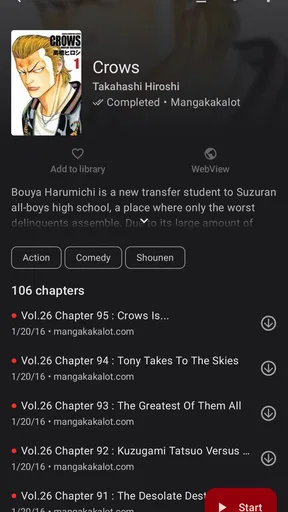
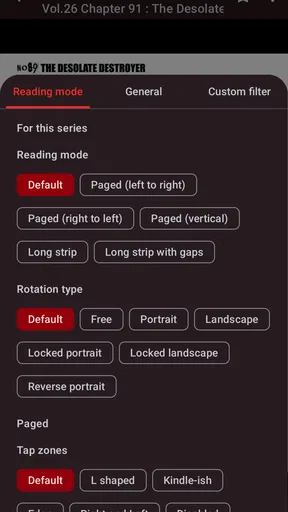
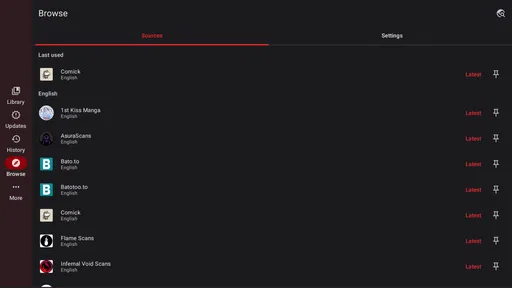
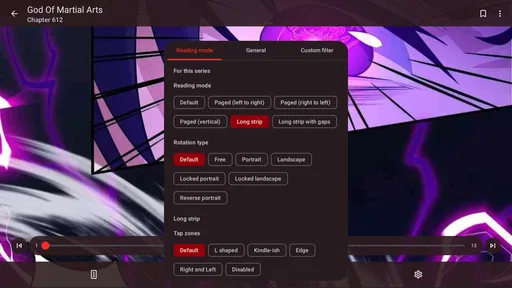
 Analysis by AppCompare
For manga readers, the choice of app is not only about finding something to read; it is also about whether browsing and settling into a chapter feels comfortable on a small screen. Abyss Reader is a free comics app from AppVerseStudio, and its current version is 6.0.3. It has a 3.8 average from around 1,300 ratings, with over 50,000 installs. Those figures suggest a modest but established audience, not a guarantee that every reader will find the catalog or workflow they want. I’d approach it as an option to try for casual manga reading, while checking that its available titles and reading tools suit your habits.
How it fits into a manga-reading routine
The app’s short store description is simply “Abyss Reader,” while its broader pitch points toward comics, laughs, and adventure. That gives a general sense of its subject, but the useful question for a reader is how the app feels once a story is open. In practice, I’d judge it by a few everyday tasks: finding a series, returning to the right chapter, and reading comfortably when I have only a few minutes.
A typical use might be opening a chapter during a lunch break, then coming back to the same story later in the evening. For that kind of stop-and-start reading, a clear way to resume matters more than a crowded feature menu. If you mainly want a lightweight place to browse manga on your phone, Abyss Reader is worth considering; if your routine depends on a carefully curated catalog, advanced library management, or dependable continuity across several devices, compare it with established alternatives before settling in.
What the current version tells me
The app was released on August 20, 2023, and version 6.0.3 is the current release. That is a useful snapshot of where the product stands, but a version number alone does not tell me which features changed between releases or how the interface has evolved. I wouldn’t assume that a higher version automatically means a particular improvement. For someone installing it now, the practical test is whether the current build handles the reading basics consistently on their device.
Its age rating is Everyone, and the minimum Android requirement is 8.0. The app is free, which lowers the barrier to trying it, but “free” is not the same as a promise about every part of the experience. Before building a long reading habit around it, I’d check how the content is presented, whether any interruptions affect reading, and whether the titles I want are actually available. Those checks are more helpful than relying on broad expectations about a comics app.
Who may enjoy it—and who may want another option
I’d point casual readers toward Abyss Reader if they want to sample manga without making a purchase up front. It may also suit someone who reads in short bursts and prefers trying an app directly rather than planning a large digital collection. The rating, based on around 1,300 user ratings, offers some social context, but it should be read as a mixed signal rather than a personal recommendation: your experience will depend heavily on the series you want and how you like to read.
On the other hand, readers who rely on official publisher apps, a particular back-catalog, or a tightly organized collection should compare the available choices first. A specialist service may be a better fit if its licensed selection and library tools are the priority. Likewise, if you want a general e-book reader for novels rather than comics, a standard book app is the more natural choice. Abyss Reader’s appeal is specifically as a comics-reading option, not as a replacement for every kind of reading software.
Worth Reading Before You Choose

EA SPORTS FC Mobile 26 Is a Bigger Football Game, but It Takes Time

Flipboard Shows What News Apps Must Do Beyond the Feed

Switching to Android Auto Means Rethinking Your Driving Routine

Google Calendar Makes a Crowded Week Easier to Manage

Ludo King Makes the Most of the Minutes Between Plans

Baby Panda World Brings Quick Play to Modern Phones, but Its Game Library Feels Busy
Small habits that make the trial more useful
When trying a new manga app, I avoid judging it from one quick browse. I look for a series I genuinely want to follow, read a complete chapter, close the app, and then see how easy it is to return to that point. This simple routine exposes the details that matter over time: whether navigation feels predictable, whether chapter changes interrupt the flow, and whether the reading view remains comfortable after several pages.
I’d also test it in the settings I actually use rather than tuning everything for an ideal scenario. A few minutes in bright daylight and another short session in a dim room can reveal whether the screen is easy on the eyes. If I switch between devices, I’d verify that workflow with a real reading session before trusting it with a long series. These are practical checks, not assumptions about what the app supports, and they help distinguish a promising first impression from a tool that fits daily use.
Where the trade-offs matter
A free app can be appealing when you are unsure how often you will read, but choosing on price alone can lead to frustration if the catalog does not match your interests. I would put content availability ahead of extra polish: an attractive interface cannot make up for missing series. Conversely, if you are browsing casually and have no fixed reading list, a smaller or unfamiliar service may be perfectly adequate. The right choice depends on whether discovery or dependable access to specific titles matters more to you.
There is also a difference between reading a chapter now and managing a long-term collection. If you keep track of several ongoing stories, pay attention to how easy it is to remember what you have read and where to continue. If you mostly finish a story in one sitting, those organizational details may matter much less. I’d make that distinction before comparing Abyss Reader with a subscription-based comics service or a publisher’s own app, since each approach serves a different reading habit.
Reading comfortably in ordinary moments
Imagine waiting for an appointment with only a few minutes to spare. You want to open a chapter, read without a complicated setup, and leave when your name is called. A sensible trial of Abyss Reader is to see whether it lets you move from the app’s main screen into a story and back again without losing your bearings. The same test works on a commute, though I’d avoid relying on any app’s offline access unless I had confirmed that the specific content I need is available without a connection.
That last point is useful for travel, too. Before a flight or a stretch with unreliable reception, check whether the series can be accessed in the way you expect and test it before leaving home. This is a general precaution rather than a claim about a particular download feature. It prevents the common disappointment of discovering that a reading plan depends on a connection at the exact moment you do not have one.
What I would check before making it my regular reader
A reader deciding whether to keep the app can answer several practical questions with a short trial. Does it have the manga you came for? Can you find the next chapter without hunting through menus? Does the screen stay comfortable at your preferred brightness and text or image scale? If those basics work, the app may be enough for occasional reading. If one of them repeatedly gets in the way, another comics app with a better-fitting catalog or navigation is likely the wiser choice.
I would also consider the difference between trying the app and relying on it. A quick install is low commitment because there is no purchase price, but building a reading routine involves more than opening it once. Readers who value a stable, long-running library should spend time checking how the app behaves across several sessions before making it their main destination. Those who simply want to explore a few stories can make that decision with a lighter test.
My take after weighing its place
Abyss Reader is best approached as a focused, free comics app whose suitability depends on the titles and reading routine you bring to it. Its audience and rating show that people are using it, while neither fact settles whether it is right for an individual manga fan. I like the low-commitment way to try it, but I would not choose it sight unseen if a specific catalog, publisher source, or collection workflow is essential to me.
If you are curious, install it, search for a series you already care about, and read enough to test the whole path from discovery to returning later. That gives you a more honest answer than judging it by a broad promise or a single rating. For casual exploration, it could be a convenient addition; for readers with precise requirements, comparing it with a specialist alternative first is time well spent.
Jumping into Abyss Reader is like diving into a well-organized ocean of books. The app is available for both Android and iOS, making it super accessible no matter what device you're using. Once you download it, the setup is a breeze. I was up and running in no time, ready to explore the features that this app boasts.
One thing that caught my attention immediately was the sleek and intuitive design. It's clear that a lot of thought went into making the user interface friendly and easy to navigate. Whether you're tech-savvy or just starting out with apps, you'll find your way around without any hiccups.
Features You’ll Love
What really makes Abyss Reader stand out is its range of features that cater to both hardcore bibliophiles and those who read occasionally. Let me walk you through some of the highlights:
- Customizable Reading Experience: You can tweak the font, size, and background color to suit your reading preference. Whether you're reading in the dark or in broad daylight, Abyss Reader has got you covered.
- Offline Reading: One of the coolest features is the ability to download books and read them offline. Perfect for those long commutes or when you're off the grid.
- Notes and Highlights: Like to jot down thoughts or highlight passages? This app lets you do just that, and it organizes them neatly for future reference.
- Sync Across Devices: If you're bouncing between your phone and tablet, Abyss Reader keeps your place and notes synced seamlessly.
Personal Experience
Now, let's talk about my personal experience. I dove into a mystery novel using Abyss Reader, and I must say, it was delightful. The customizable settings meant I could adjust the reading environment to my liking, making the experience all the more immersive. I also appreciated how easy it was to highlight interesting quotes and take notes without disrupting my reading flow.
Switching between devices was smooth as silk. I started reading on my phone and picked up right where I left off on my tablet later in the day. It's these little conveniences that make a big difference.
Final Thoughts
In a world where digital reading is becoming the norm, Abyss Reader is a must-have app for anyone who loves to read. It's packed with features that enhance the reading experience without overwhelming the user. Whether you're an avid reader or just someone who picks up a book now and then, this app caters to all your reading needs.
If you haven't tried it yet, I highly recommend you give it a go. It might just become your go-to reading app, just like it has for me.
Pros
- Smooth and intuitive user interface.
- Large library of e-books available.
- Customizable reading settings.
- Offline reading supported.
- Sync across multiple devices.
Cons
- Limited free content selection.
- Ad-supported unless subscribed.
- Occasional sync issues.
- Requires account registration.
- Some features locked behind paywall.
FAQs for Abyss Reader
What is Abyss Reader and what are its main features?
Abyss Reader is a versatile e-book reader designed for both Android and iOS devices. It supports multiple formats such as ePub, PDF, and MOBI, providing a seamless reading experience. Key features include customizable fonts, night mode, and synchronization across devices. Users also enjoy integrated dictionaries and a user-friendly interface for easy navigation.
Is Abyss Reader free to use or does it require a subscription?
Abyss Reader offers a free version with basic features suitable for casual readers. However, for an ad-free experience and access to advanced features like cloud sync and premium fonts, a subscription is available. This makes it ideal for avid readers who want a more personalized and enhanced reading experience.
How can I import my existing e-book collection into Abyss Reader?
Importing your current e-book collection into Abyss Reader is straightforward. Users can easily upload files via Wi-Fi transfer, email, or directly from cloud storage services like Google Drive and Dropbox. The app automatically organizes your library, making it easy to access and manage your books on the go.
Does Abyss Reader support offline reading, and how does it handle annotations?
Yes, Abyss Reader supports offline reading, which is perfect for users who travel frequently or have limited internet access. The app allows users to highlight text, make notes, and bookmark pages. All annotations are saved locally and can be exported or synced across devices if the premium subscription is active.
What kind of customer support does Abyss Reader offer if I encounter any issues?
Abyss Reader provides comprehensive customer support through its in-app help section and online FAQ. Users can contact the support team via email for personalized assistance. The app also features a community forum where users can share tips and troubleshoot common issues with fellow readers.


